
Short Answer
Overview
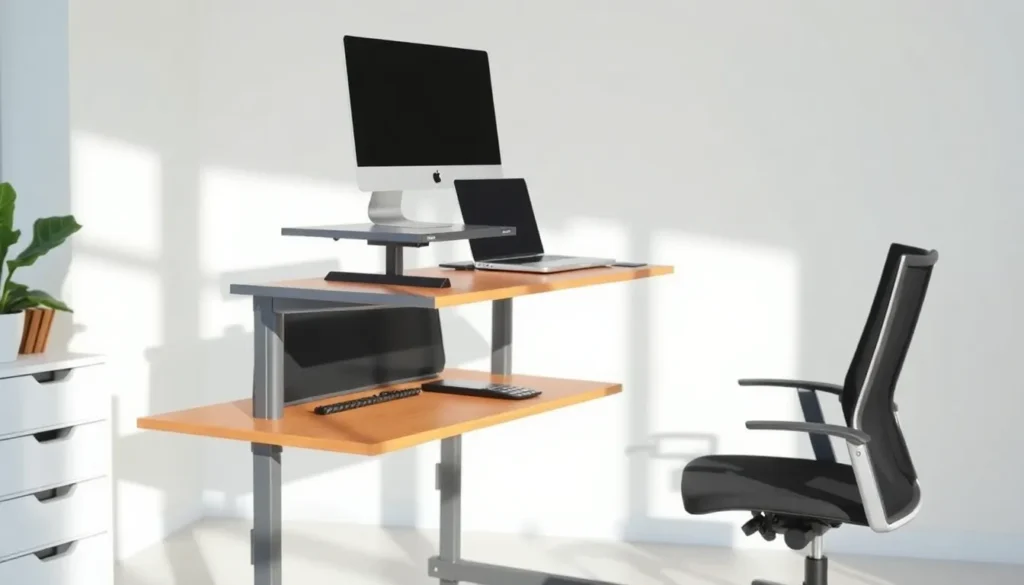
A riser desk is a type of desk accessory or standalone furniture designed to elevate the user’s work surface, typically for ergonomic benefits. This elevation can apply to the entire desktop or specific components such as computer monitors or laptops. Riser desks are frequently used to promote healthier posture by allowing users to alternate between sitting and standing positions or to raise screens to eye level, reducing neck and back strain.
Detailed Explanation
Riser desks come in various forms, including adjustable platforms placed on top of existing desks, or integrated standing desks that can be raised or lowered. The primary goal is to improve ergonomics by aligning the workspace with the user’s body dimensions and work habits. They often support multiple configurations, enabling a transition from sitting to standing without replacing the entire desk. Some risers are manually adjustable, while others use electric or pneumatic mechanisms for height adjustment.
The rise in popularity of riser desks correlates with increased awareness of the health risks associated with prolonged sitting, such as musculoskeletal disorders, reduced circulation, and decreased productivity. By facilitating standing work periods, riser desks aim to mitigate these risks.
How It Works
A riser desk works by elevating the work surface or display devices to a height that aligns with ergonomic principles. Adjustable risers typically feature mechanisms that allow the user to set the height according to their comfort and specific task requirements. When used as a standing desk converter, the riser is placed atop a conventional desk, lifting laptops, monitors, keyboards, and other accessories.
Some riser desks include features such as tilting surfaces, cable management systems, and multiple tiers to accommodate different equipment. Users can switch between sitting and standing by adjusting the riser height, which encourages movement and reduces static posture.
Examples
- Adjustable Standing Desk Converters: Platforms that sit on top of an existing desk and can be manually or electronically raised or lowered.
- Fixed Height Riser Platforms: Simple, non-adjustable stands designed to raise monitors or laptops to eye level.
- Multi-tier Riser Desks: Desks with separate elevated surfaces for monitors and keyboards to optimize ergonomic positioning.
Why It Matters
Riser desks are significant because they address ergonomic concerns associated with traditional desk setups. By facilitating standing work or proper screen height, they contribute to reduced strain on the neck, shoulders, and back. This can improve comfort, reduce the risk of repetitive strain injuries, and potentially enhance productivity. Additionally, riser desks support workplace health initiatives aimed at reducing sedentary behavior.
Common Misconceptions
Misconception: Riser desks are only for standing.
Correction: While many riser desks enable standing, some are designed solely to elevate monitors or laptops without changing the user’s seated position.
Misconception: All riser desks are electronically adjustable.
Correction: Many riser desks are manually adjustable or fixed-height and do not require electricity.
Pros and Cons
Pros:
- Improves ergonomic posture by raising work surfaces or screens.
- Facilitates alternation between sitting and standing positions.
- Can be added to existing desks without full replacement.
- Variety of designs to suit different work environments and budgets.
Cons:
- Some models may be bulky or limit desk surface space.
- Manual adjustment can be inconvenient for frequent changes.
- Not all risers accommodate all types of equipment or user heights.
- Initial cost may be high for electronically adjustable versions.
Comparison Table
| Aspect | Riser Desk | Standard Desk |
|---|---|---|
| Meaning | Accessory or desk designed to elevate the work surface or monitor for ergonomic benefits. | Traditional flat surface desk without elevation features. |
| Adjustability | Often adjustable in height, either manually or electronically. | Typically fixed height. |
| Ergonomics | Improves posture by enabling standing and better screen positioning. | Limited ergonomic features, may contribute to static posture. |
| Installation | Can be placed on existing desks or used as standalone units. | Requires full desk replacement for changes. |
| Cost | Varies widely; adjustable models generally more expensive. | Generally less expensive but less flexible. |
Decision Checklist
What is the easiest way to understand a Riser Desk?
The easiest way to understand a riser desk is to think of it as a platform or adjustable surface that lifts your work materials higher, enabling you to work while standing or to position your screens at eye level for better posture. It is a tool designed to adapt your existing workspace to your ergonomic needs.
FAQ
Can a riser desk help reduce back pain?
Yes, by elevating the work surface or monitor to a more ergonomic height, riser desks can reduce strain on the back and neck, potentially alleviating pain caused by poor posture.
Are riser desks suitable for all types of desks?
Most riser desks are designed to be compatible with standard desk surfaces, but it is important to check dimensions and weight limits to ensure compatibility with your specific desk.
Do riser desks require professional installation?
Typically, riser desks are easy to install and do not require professional assistance. They often come ready to use or with simple assembly instructions.





Leave a Reply