
Short Answer
Overview
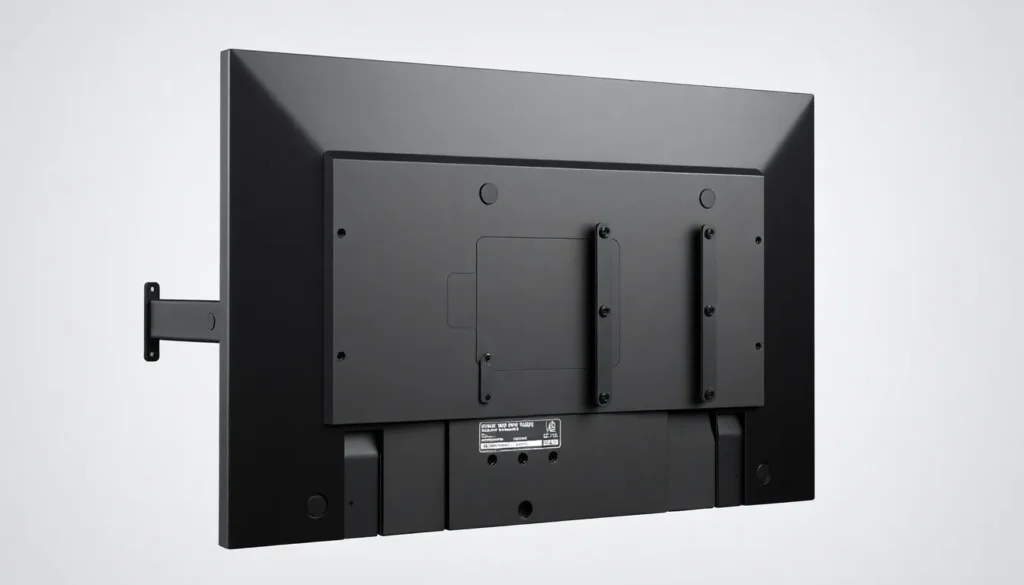
A VESA mount refers to a standardized mounting interface defined by the Video Electronics Standards Association (VESA). It specifies the dimensions and hole patterns on the back of flat panel displays, such as monitors and televisions, to enable secure attachment to stands, arms, or wall mounts. This standardization facilitates compatibility and interchangeability between display devices and mounting hardware from different manufacturers.
Detailed Explanation
The VESA mounting standard outlines specific measurements for screw hole placement on the rear of display panels. These measurements are typically expressed in millimeters and correspond to square or rectangular patterns. Common VESA patterns include 75×75 mm, 100×100 mm, 200×200 mm, and larger, depending on the size and weight of the display. The standard also defines screw thread sizes and lengths to ensure secure attachment.
Adoption of the VESA standard has become widespread in the electronics industry, allowing consumers and professionals to select compatible mounts and accessories without concern for proprietary mounting systems. The standard is primarily applied to flat-panel LCD, LED, and OLED displays.
How It Works
VESA mounts consist of a set of threaded holes arranged according to specific dimensions on the back of a display. Mounting hardware, such as brackets or arms, includes corresponding screws and attachment points. To mount a display, the user aligns the mount’s screw holes with the VESA pattern on the device and secures it using appropriate screws.
Different VESA patterns accommodate various display sizes and weights. Smaller displays often use the 75×75 mm or 100×100 mm patterns, while larger displays require bigger and more robust mounting patterns. The mounting hardware must also support the weight and size specifications indicated by the VESA standard to ensure safety and stability.
Examples
- Computer Monitors: Most modern desktop monitors include VESA mounting holes measuring 100×100 mm, allowing users to attach adjustable arms or wall mounts for ergonomic positioning.
- Televisions: Many flat-screen TVs, especially those over 32 inches, incorporate VESA patterns such as 200×200 mm or larger to facilitate wall mounting.
- Industrial and Commercial Displays: Specialized displays for digital signage or control rooms often use VESA mounts to integrate screens into custom setups or enclosures.
Pros and Cons
Pros:
- Standardization facilitates compatibility across manufacturers.
- Enables versatile mounting options, including wall mounts and adjustable arms.
- Simplifies installation and replacement of display devices.
- Supports ergonomic and space-saving setups.
Cons:
- Not all displays are VESA compatible, especially some smaller or proprietary models.
- Incorrect screw size or pattern can cause damage or insecure mounting.
- Weight limits must be respected to ensure safety.
Comparison Table
| Aspect | VESA Mount | Alternative/Related Topic |
|---|---|---|
| Meaning | Standardized mounting hole pattern for displays. | Proprietary Mounting Systems – Custom mounting interfaces made by specific manufacturers. |
| Compatibility | Universal among compliant displays and mounts. | Limited to specific device and mount models. |
| Flexibility | Supports various mounting styles like wall, desk, or arm mounts. | Varies; often restricted to fixed mounts. |
| Adoption | Widely adopted industry standard. | Less common, varies by brand. |
Decision Checklist
- Use this if you want a universal mounting solution compatible with many displays and mounts.
- Avoid this if your display lacks VESA mounting holes or uses a proprietary system.
- Check this first by verifying the VESA hole pattern and screw sizes on your display before purchasing a mount.
What is the easiest way to understand VESA Mount?
The simplest way to understand a VESA mount is to think of it as a standardized pattern of holes on the back of a monitor or TV designed to match mounting brackets. This uniformity allows different brands and types of mounts to fit displays interchangeably, much like how standardized screw threads allow various screws and nuts to work together.
FAQ
What does VESA stand for?
VESA stands for Video Electronics Standards Association, an organization that sets standards for video electronics, including mounting interfaces.
How do I find the VESA size for my monitor?
You can measure the distance in millimeters between the mounting holes on the back of your monitor, usually arranged in a square or rectangle pattern.
Can I use a VESA mount on any monitor?
Only monitors that have VESA mounting holes compatible with the mount's pattern and screw size can be used with a VESA mount.




Leave a Reply