
Short Answer
Overview
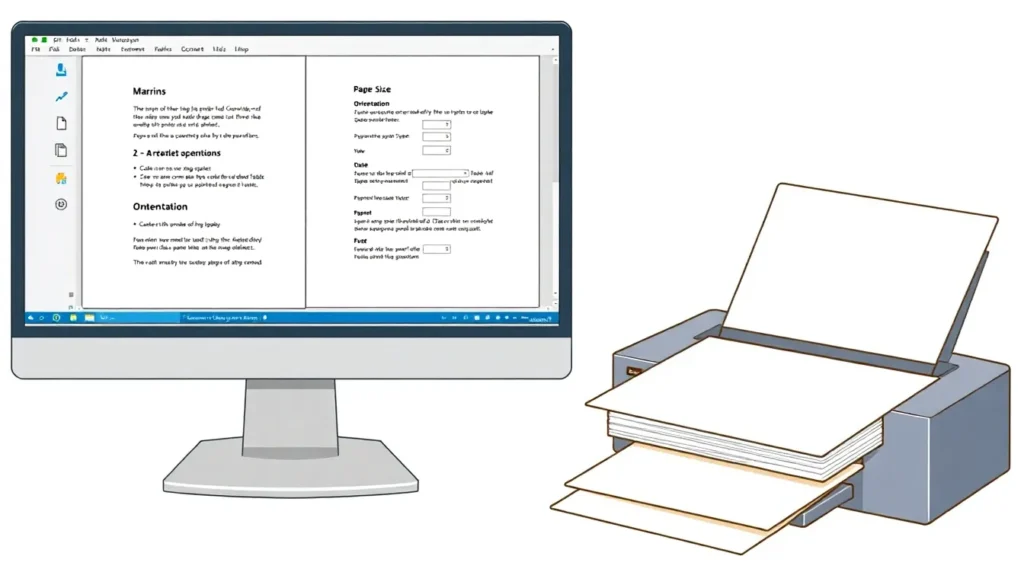
Page setup is a fundamental concept in document preparation and refers to the process of configuring the layout and formatting parameters that determine how content is displayed on a page. This includes settings such as paper size, page orientation (portrait or landscape), margins, header and footer placement, and sometimes other print-related options. Page setup ensures that the document meets specific requirements for readability, aesthetic presentation, and print compatibility.
Detailed Explanation
In most word processing and desktop publishing software, page setup is an essential step before printing or finalizing a document. It influences the spatial distribution of text and images, helping control where content begins and ends on a physical or virtual page. Common options within page setup include selecting the paper size (e.g., A4, Letter, Legal), adjusting margins (top, bottom, left, right), choosing the page orientation, and configuring headers and footers. These settings collectively define the printable area and how the document will appear when outputted.
How It Works
When a user accesses the page setup feature in software, they are presented with options that allow customization of the page layout. Changes made in this dialog or interface affect the entire document or selected sections, depending on the software’s capabilities. Once set, the software recalculates the layout of the content to fit within the defined parameters. This recalculation ensures that text, images, tables, and other elements comply with the new boundaries, preventing content from being cut off or improperly spaced.
Examples
- In Microsoft Word, the Page Setup dialog allows users to select paper size, orientation, and margins. For example, switching from portrait to landscape orientation rotates the page so that its width exceeds its height.
- In printing settings, page setup may include additional options like scaling the content to fit a page or setting the number of pages per sheet.
- In publishing software such as Adobe InDesign, page setup options influence the document grid, bleed areas, and slug zones, which are critical for print production.
Pros and Cons
Pros: Page setup provides control over document layout, ensures print compatibility, and enhances readability and presentation quality.
Cons: Incorrect page setup can cause content misalignment, waste paper due to excessive margins, or printing errors if settings do not match the printer or paper used.
Comparison Table
| Aspect | Page Setup | Print Settings |
|---|---|---|
| Meaning | Configuration of document layout parameters such as margins and orientation. | Settings related to the mechanics of printing, like printer selection and print quality. |
| Scope | Affects document appearance before printing or digital display. | Controls how the document is physically printed or outputted. |
| Typical Options | Paper size, margins, orientation, headers/footers. | Printer choice, number of copies, print resolution, duplex. |
Decision Checklist
- Use this if: You need to control how content is arranged on a page or prepare a document for printing.
- Avoid this if: You only need to change printer hardware settings or print quality without altering layout.
- Check this first: Ensure the paper size and orientation match the intended output device or paper used.
What is the easiest way to understand Page Setup?
The easiest way to understand page setup is to think of it as setting the boundaries and orientation for a sheet of paper on which your document will be displayed or printed. It determines how much space is left around the content and the direction in which it is presented, much like framing a picture before hanging it on a wall.
FAQ
What is the main purpose of page setup?
The main purpose of page setup is to configure the layout parameters of a document, such as margins and orientation, to ensure proper presentation and printing.
Can page setup affect digital documents?
Yes, page setup affects both printed and digital documents by defining how content is arranged and displayed on the page.
Is page setup the same as print settings?
No, page setup focuses on document layout, while print settings control the printing process itself, such as printer selection and print quality.



Leave a Reply